Lease and finance in one workspace
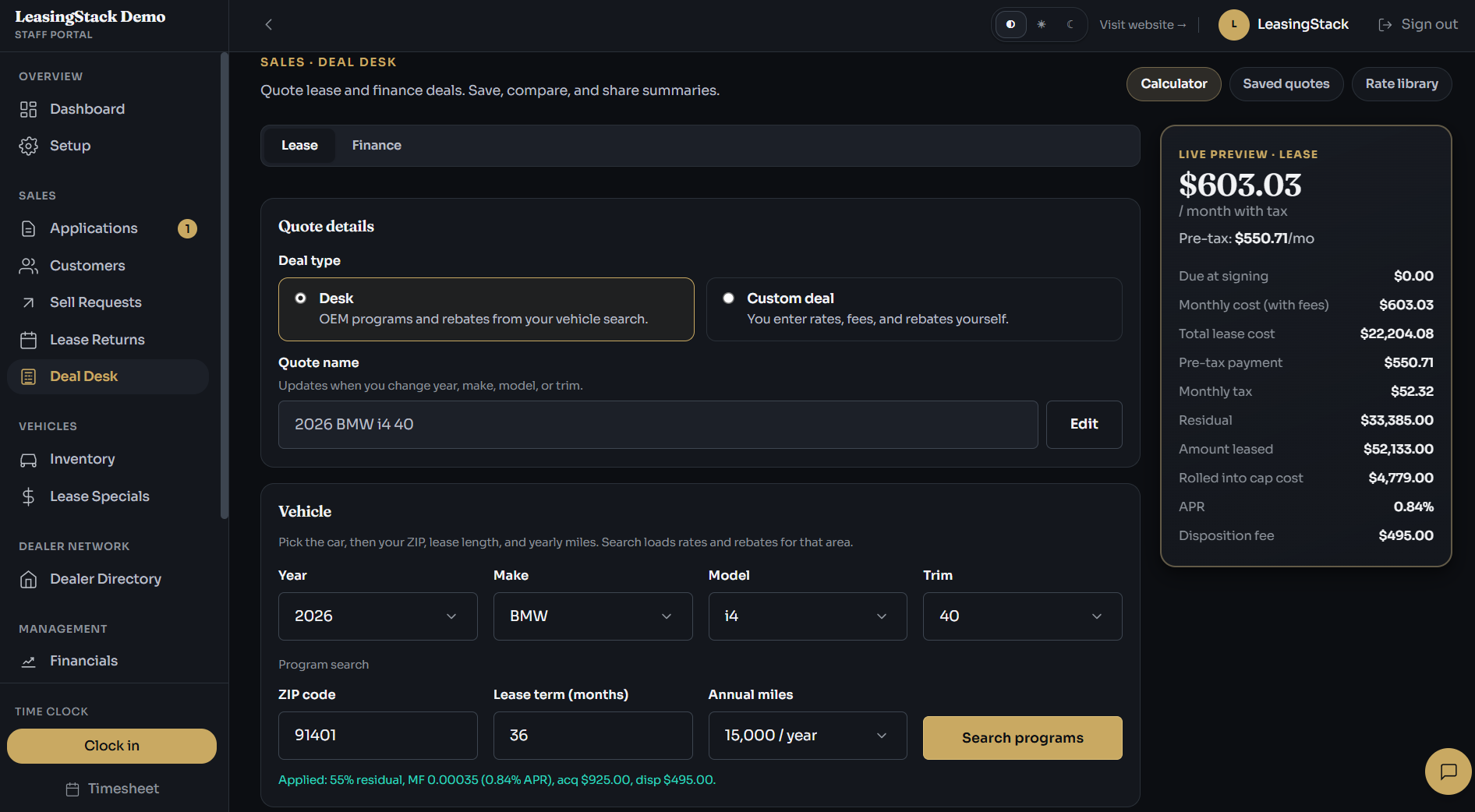
Switch between lease and retail finance quotes so your team can answer payment questions in the same portal they use for customers and deals.
Feature
Give your sales team one place to build payments, apply program and rebate estimates, and hand the buyer a clean branded quote without jumping between spreadsheets and separate calculator tools.
Capabilities
Core workflows brokerages use daily, organized in one workspace instead of scattered tools.
Switch between lease and retail finance quotes so your team can answer payment questions in the same portal they use for customers and deals.
Search available programs for supported vehicles and bring rebate estimates into the quote as a starting point for your desk conversation.
Show monthly payment, due at signing, and line items in plain language so managers and sales staff stay aligned before the customer signs.
Print or save a PDF with your brokerage logo and contact details so the buyer leaves with a professional document, not a screenshot.
Start from a supported vehicle search when programs are available, or enter a custom deal when you already have your own numbers.
Save quotes to revisit with the customer, adjust terms, or share internally before you finalize with the lender.
Workflow
01
Search programs for supported makes and models, or enter a custom deal when you are working your own terms.
02
Pull in program and rebate estimates to build the payment you plan to present.
03
Check monthly payment, due at signing, and summary line items with your team before you talk numbers with the buyer.
04
Hand the customer a branded PDF or save the quote to pick up on the next call.
Modules
Residual, money factor, fees, and tax-aware payment summary.
Retail finance payments with rate and term controls.
Supported vehicle search with OEM incentive and rebate lookup.
Branded printable quote using your brokerage identity.
Roles
Build and present quotes during live customer conversations.
Review saved quotes and coach the team on consistent presentation.
Set branding that appears on printed quotes and manage access.
Deal Desk is focused on front-line quoting; finance staff use financial modules elsewhere in the portal.
Buyers expect a clear payment breakdown on the spot. Deal Desk keeps quoting inside the same portal as your pipeline so you are not rebuilding numbers in a separate tool every time.
Summary
Best for
Brokerages quoting lease and finance daily
Fast win
Branded PDF in minutes
Main outcome
Faster, clearer buyer conversations
Explore
FAQ
Deal Desk is part of the LeasingStack portal for teams on supported plans. Open the live demo or sign up to confirm access for your workspace.
Yes. Deal Desk generates a branded printable quote with your logo and business details when you have branding set up in admin.
Many brokerages run daily lease and finance quotes entirely in Deal Desk. If you rely on niche lender tools, you can still use those alongside LeasingStack for intake and operations.
LeasingStack pulls OEM incentive data from licensed third-party market sources for supported vehicles. The numbers are starting points for desking, not a substitute for your lender's final approval.
Program rates, residuals, and incentives are sourced from third-party market data and may not reflect exact lender bulletin rates. Always verify final numbers with your lender before presenting to a client.
Feature
Give your sales team one place to build payments, apply program and rebate estimates, and hand the buyer a clean branded quote without jumping between spreadsheets and separate calculator tools.
Capabilities
Core workflows brokerages use daily, organized in one workspace instead of scattered tools.
Switch between lease and retail finance quotes so your team can answer payment questions in the same portal they use for customers and deals.
Search available programs for supported vehicles and bring rebate estimates into the quote as a starting point for your desk conversation.
Show monthly payment, due at signing, and line items in plain language so managers and sales staff stay aligned before the customer signs.
Print or save a PDF with your brokerage logo and contact details so the buyer leaves with a professional document, not a screenshot.
Start from a supported vehicle search when programs are available, or enter a custom deal when you already have your own numbers.
Save quotes to revisit with the customer, adjust terms, or share internally before you finalize with the lender.
Workflow
01
Search programs for supported makes and models, or enter a custom deal when you are working your own terms.
02
Pull in program and rebate estimates to build the payment you plan to present.
03
Check monthly payment, due at signing, and summary line items with your team before you talk numbers with the buyer.
04
Hand the customer a branded PDF or save the quote to pick up on the next call.
Modules
Residual, money factor, fees, and tax-aware payment summary.
Retail finance payments with rate and term controls.
Supported vehicle search with OEM incentive and rebate lookup.
Branded printable quote using your brokerage identity.
Roles
Build and present quotes during live customer conversations.
Review saved quotes and coach the team on consistent presentation.
Set branding that appears on printed quotes and manage access.
Deal Desk is focused on front-line quoting; finance staff use financial modules elsewhere in the portal.
Buyers expect a clear payment breakdown on the spot. Deal Desk keeps quoting inside the same portal as your pipeline so you are not rebuilding numbers in a separate tool every time.
Summary
Best for
Brokerages quoting lease and finance daily
Fast win
Branded PDF in minutes
Main outcome
Faster, clearer buyer conversations
Explore
FAQ
Deal Desk is part of the LeasingStack portal for teams on supported plans. Open the live demo or sign up to confirm access for your workspace.
Yes. Deal Desk generates a branded printable quote with your logo and business details when you have branding set up in admin.
Many brokerages run daily lease and finance quotes entirely in Deal Desk. If you rely on niche lender tools, you can still use those alongside LeasingStack for intake and operations.
LeasingStack pulls OEM incentive data from licensed third-party market sources for supported vehicles. The numbers are starting points for desking, not a substitute for your lender's final approval.
Program rates, residuals, and incentives are sourced from third-party market data and may not reflect exact lender bulletin rates. Always verify final numbers with your lender before presenting to a client.